
ePS CommandCore™ for injection moulding in rigid packaging
Rigid packaging. From estimate to shop floor.
Understand the cost. Find the capacity. See what happened on the press. Explore an illustrative workflow for a molded part, such as a cup, closure, lid, or cartridge, from estimate through molding and decoration to the shift record. Our worked example is a cartridge with screen printing.
Book an injection moulding workflow demo → Explore CommandCore →
The industry reality
A full schedule is not the same as good output.
Your customer needs a delivery date. Your planner needs an available press. Your shift lead needs to know why output fell short. Those are different questions about the same order.
Start with the mould, material and cycle-time assumptions. Follow the job through moulding and decoration. Then review the checks, waste and downtime behind the result.
“Where did we lose output last shift?”
A practical starting point for plant and operations leaders.
“Will this mould and press deliver the order at the cost we quoted?”
The question for estimators and production planners.
The cartridge workflow
Start with one order. Follow every operation.
Explore a configured injection moulding example through ERP Foundation, MES and Smart Scheduling. Radius powers estimating in ERP Foundation; PrintFlow4D® spans MES and Smart Scheduling. These screens show an illustrative workflow built around a cartridge, not measured customer results. The same approach applies to cups, jars, tubs, trays, closures, lids and preforms.
01 / ERP / Estimating
Estimate the moulded part
Build an estimate for a moulded part, starting with a cartridge. See how part weight, mould cavities, cycle time and expected scrap affect output and cost.
See the workflow ↓02 / MES / Scheduling
Plan moulding and decoration
Schedule moulding and decoration, such as screen printing or IML, then compare booked and free hours by press and week. Check mould and press eligibility, and open a press to see the jobs behind its load before promising a date.
See the workflow ↓03 / MES / Shop-floor data capture
Review checks and losses
Keep three separate views: shift performance and OEE; operator quality checks and feedback; downtime, rejects and waste, each with a reason.
See the workflow ↓01 / ERP Foundation · Radius
Understand the estimate.
What does this part cost to make? Explore how material weight, active mould cavities and cycle time shape expected output and cost before the job reaches the press.
- Review the resin, mould and cavity assumptions.
- Understand the production steps behind the quote.
- Use one repeat product to focus the walkthrough.
The estimate shown is a bottle preform example. In the demo we walk through a moulded part such as a cartridge, cup or closure.
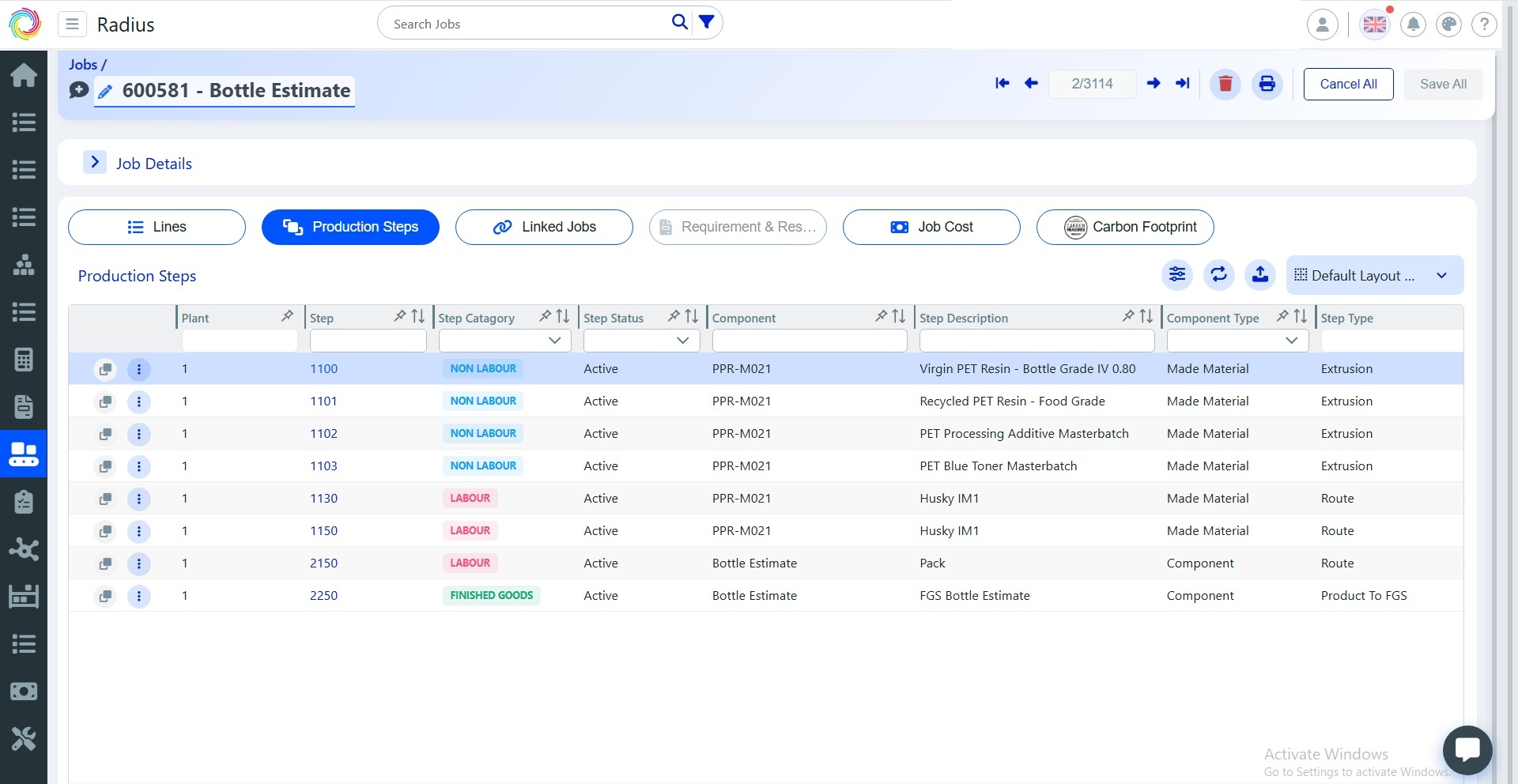
Radius production steps for the supplied bottle estimate
Illustrative workflow. Radius production-step example. Bottle preform estimate shown.
02 / MES · Smart Scheduling · PrintFlow4D®
Find capacity before promising a date.
See how work is distributed across the model plant’s 20 moulding presses and four six-colour screen printers. Compare booked work, free hours and shutdown periods, check cranes, mould and press eligibility, ensure trained operators are available, then inspect the jobs behind a press’s load.
Plant schedule
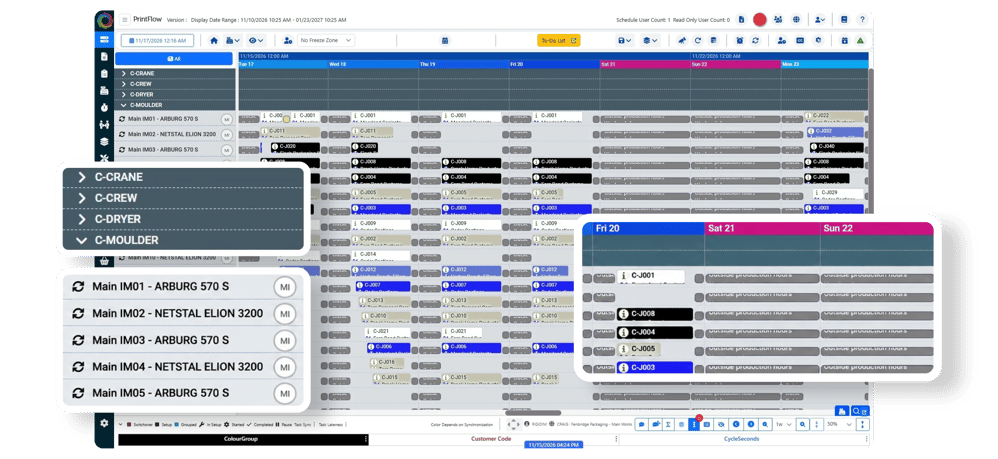
Illustrative workflow. Model-plant schedule. Select an operation to review timing and job details.
Operation details
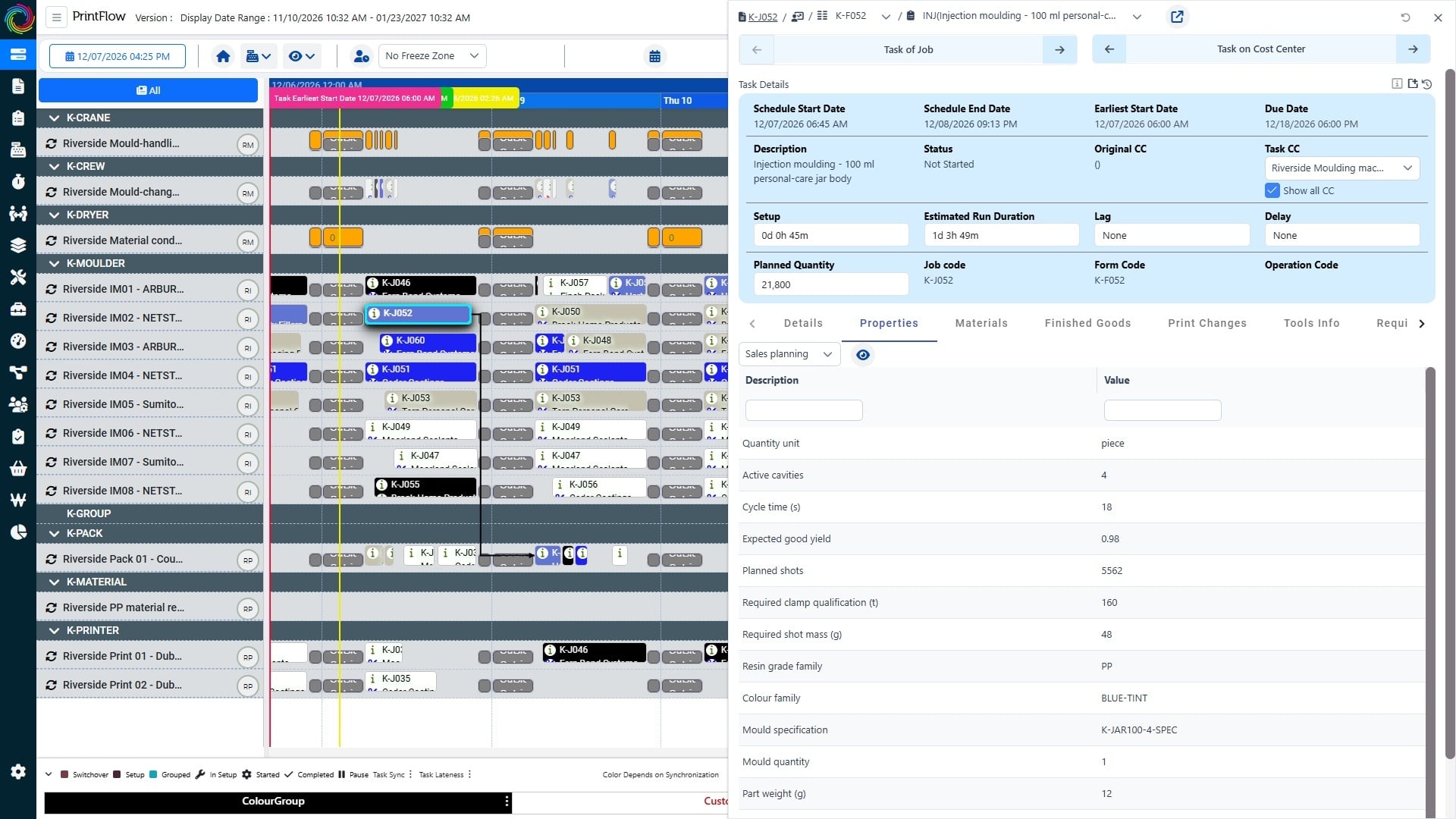
Illustrative workflow. Operation details and properties in the simulation dataset.
Press capacity
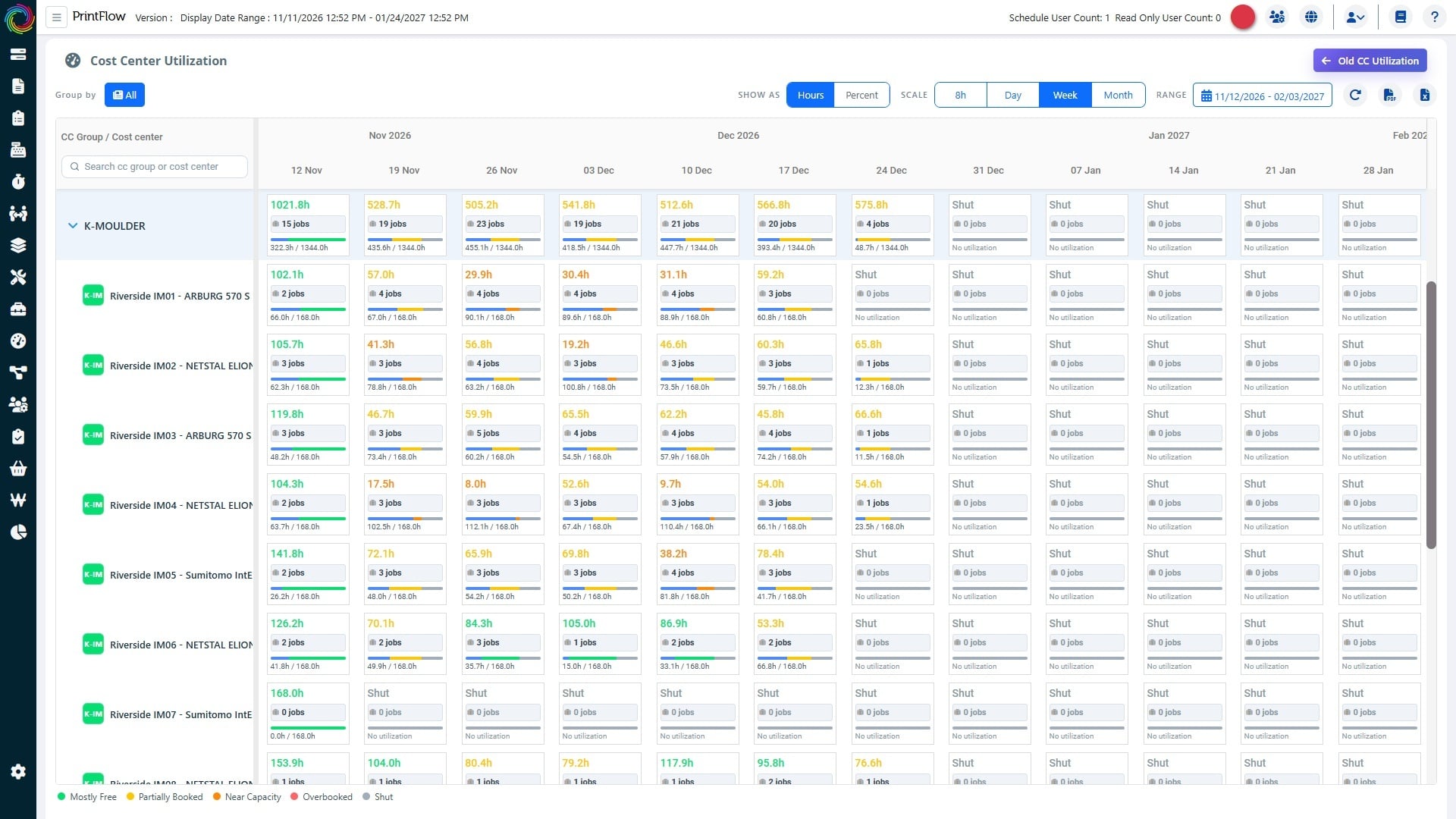
Illustrative workflow. Compare booked work, free hours and shutdown periods in the simulation dataset.
Jobs on a press
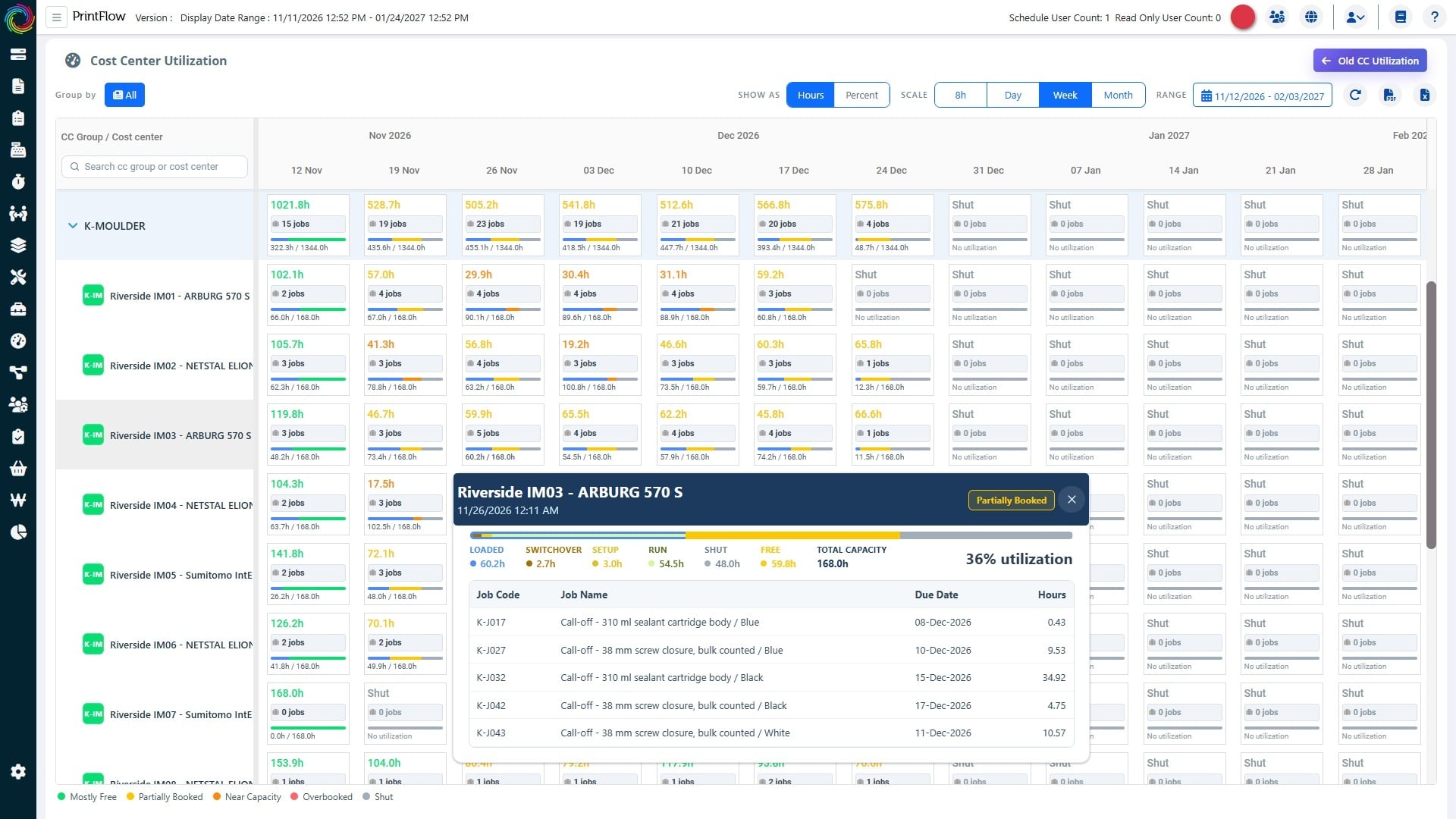
Illustrative workflow. Review due dates, setup and changeover time. Simulated press load, not actual plant performance.
03 / MES · Shop-floor data capture
Review the run. Understand the losses.
The operator can review the running job, its output and quality checks at the press, including cycle counts, active cavities, good parts and rejects. Supervisors can compare presses and review the exceptions that need attention.
Shift overview
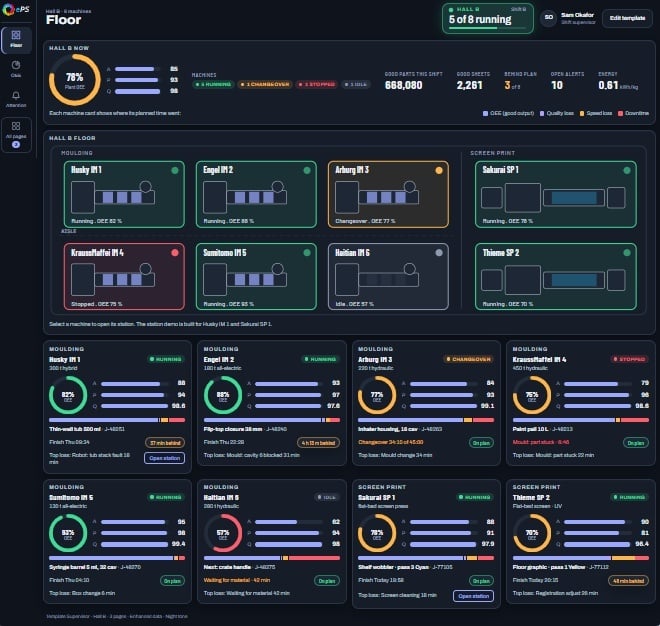
Illustrative workflow. Plant overview with model resource performance.
Operator checks
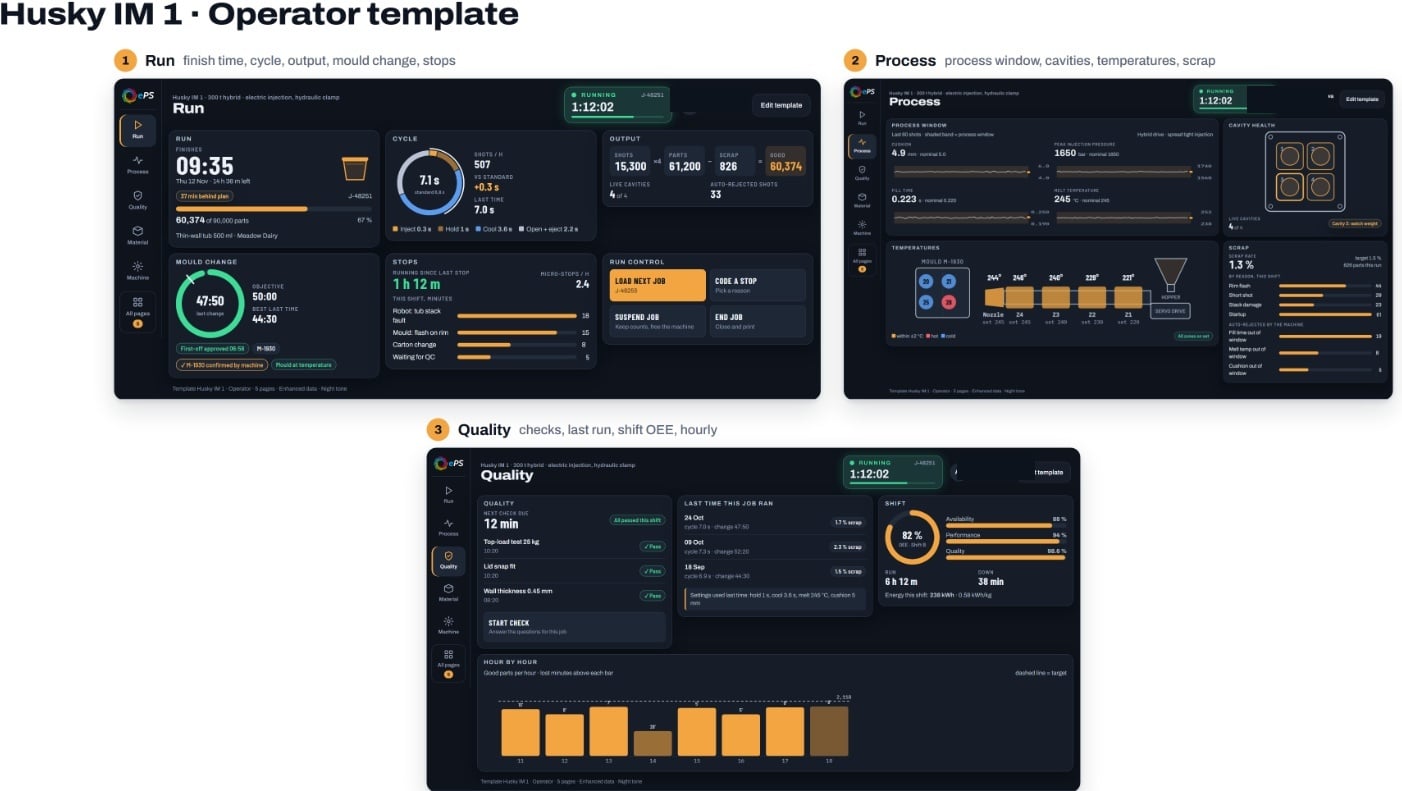
Illustrative workflow. Operator template: run, process and quality checks.
Production losses
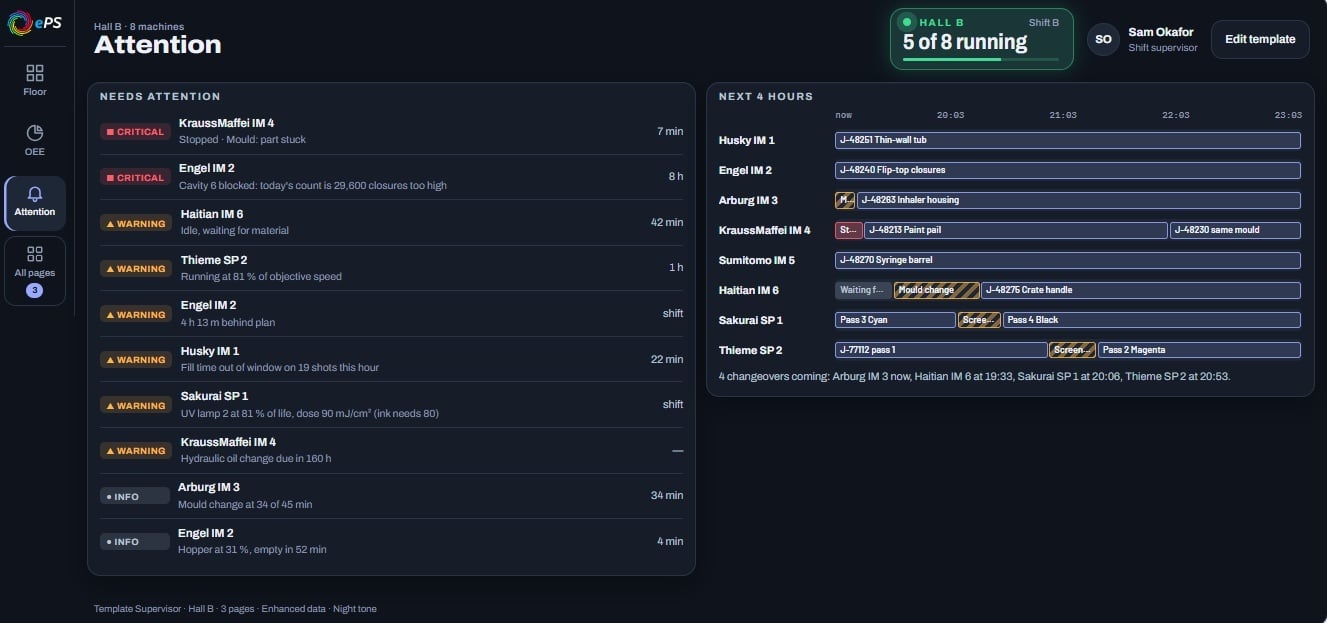
Illustrative workflow. Exceptions view for investigating production losses.
Material and machine
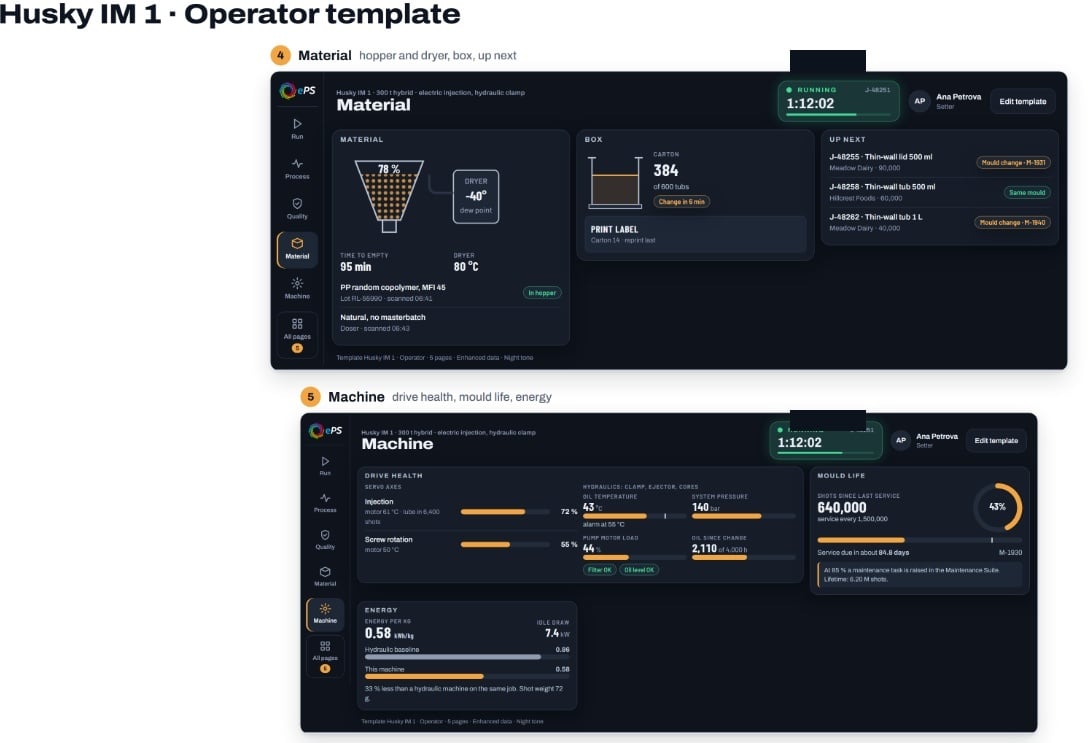
Illustrative workflow. Material and machine templates. Site connectivity requires validation.
OEE compararison
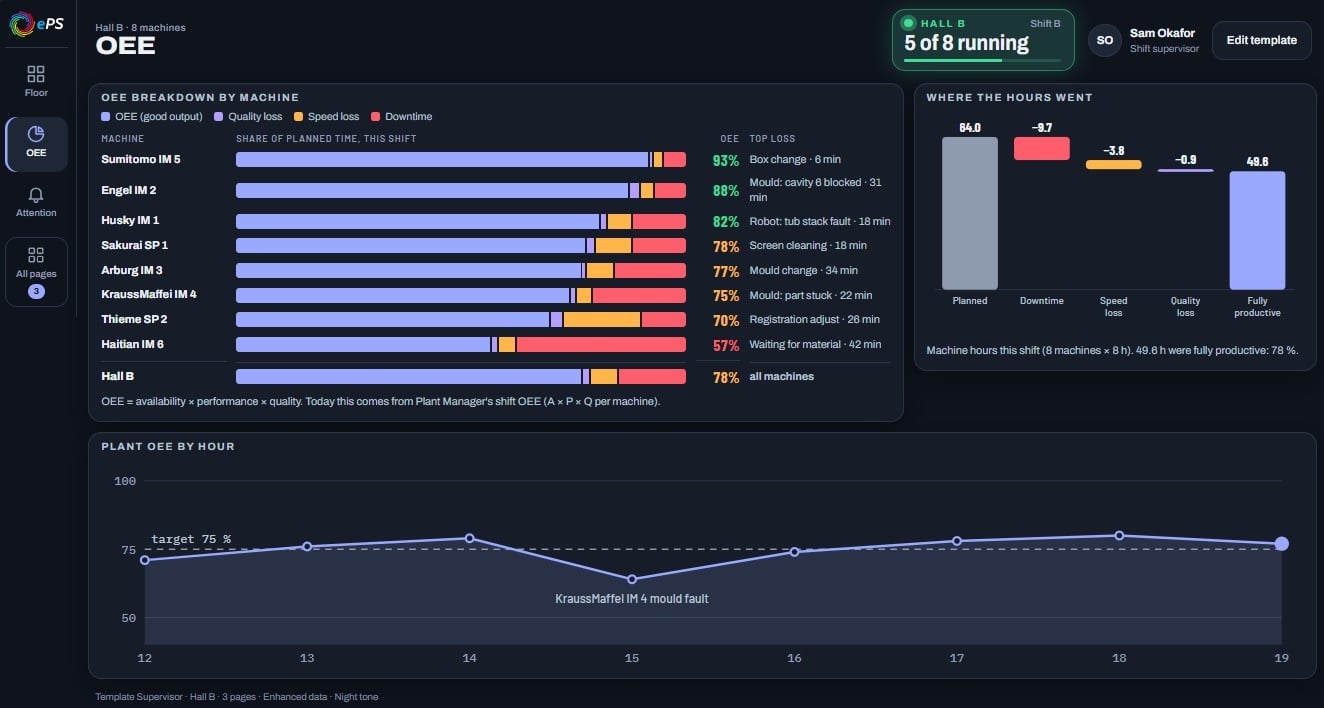
Illustrative workflow. Compare OEE across resources using illustrative plant data.
One order. Three production questions.
Where could your plant recover good output?
Overall equipment effectiveness (OEE) brings three factors together: Availability × Performance × Quality. Use them to ask where output is being lost, then investigate the same order rather than three disconnected reports.
Availability
Where did production time go?
Review the press load, setup and changeover time, and recorded downtime reasons. Discuss what the plan could do differently on the next run.
Performance
Did the run meet its expected output?
Review shift performance against the cycle-time and output assumptions used in the estimate. Identify where actual performance needs investigation.
Quality
How much of that output was good product?
Review operator checks, feedback and reject reasons such as short shot, flash and start-up scrap. Use the records to support the quality processes your plant already follows.
The screens show a configured, illustrative workflow, not a measured improvement at a customer plant. Machine connectivity depends on your equipment and is assessed on site.
Built for how moulders work
Whatever you mould, follow the part.
Injection moulding runs on cavities, cycle time and tooling. ePS keeps those variables with the job, from the estimate to the shift record.
01
Your products
Cups, jars, tubs, trays, closures, lids, caps, preforms, cartridges and other containers.
02
Tooling library
Keep moulds, mandrels and other tools for the injection moulding process in Radius, linked to the items, cavities and presses that use them.
03
Decoration and labelling
Plan screen printing as good parts become available. Radius is already well established in labelling, with a certified labelling workflow used by many companies, which gives moulders that use in-mould labelling (IML) a familiar starting point.
Your route into ePS CommandCore
Begin with the workflow. Build on one foundation.
Radius powers estimating in ERP Foundation. PrintFlow4D® spans MES and Smart Scheduling. Start with the area your team needs to explore, and agree the scope against your site’s processes and systems.
A practical first conversation
Start where your plant needs visibility.
Already have an ERP? Explore a MES-only route. Existing ePS customer? Choose one site and one repeat product to focus the walkthrough.
- Plant and operations leaders: where did we lose output last shift?
- Estimators and planners: will this mould and press deliver the order at the cost we quoted?
- Bring one repeat job, your production question and the records available at the site.
Validate fit at your site.
Machine signals on newer and older presses, scale integration, recipe transfer, settings write-back and ERP or data-lake interfaces depend on the site. Discuss a technical assessment before committing to these capabilities.
The walkthrough focuses on injection moulding. Thermoforming, blow moulding and other rigid processes will follow as each workflow is ready.
Quantified savings, production-proven results and rollout timing require a validated pilot.
CommandCore architecture
The pillars that matter most here
Deploy one pillar or connect the full platform. Every capability works from the same packaging-native foundation.
One flow for every label variation
CommandCore brings commercial, prepress and production decisions together for pressure-sensitive, shrink-sleeve and specialty label workflows. Product definitions stay consistent while each plant can run the equipment and sequence that fits the job.
- Radius
- Metrics
- Paxis
- PrintFlow 4D
- AC4D
- UDE
- User-defined substrates, web widths, sheet sizes and finishing routes
- Tooling, artwork and pre-production assets linked to repeat work
- Combination-job and short-run scheduling across digital and flexo
- Roll-to-label genealogy through shifts and conversion stages
- Inspection, waste and downtime captured against the estimate
- Customer service and production working from the same order status
Book an injection moulding workflow demo.
Walk through one order with your production planner or shift lead. Explore the estimate, schedule and shop-floor views against the way your plant runs.
Requests are sent through your email app to info@epssw.com. No request is sent until you send that email.
Get in touch
Let’s Talk
Ready to transform your packaging operations? Our team of industry experts is here to help you find the right solution.
Product Support
Existing customers can access our dedicated support portal for technical assistance.
Access Support Portal